UpperVoid Studio · Reference Library · Edition 01, 2026

AI can write code—
but can't yet see.

Design tools generate pixels, not taste. We built a reference library of 93,000+ curated visuals and 48 theory documents so your next interface doesn't look like everything else.

Browse the collection
From the collection Showing 8 of 93,000+
App Store Graphics
Spotify App Store screenshot Spotify — Music
Bear App Store screenshot Bear — Productivity
Nike Run Club App Store screenshot Nike Run Club — Fitness
Darkroom App Store screenshot Darkroom — Photo
Halide App Store screenshot Halide — Photo
Shazam — music recognition Shazam — Music
Icons & Logos
Headspace app icon Headspace
Bear app icon Bear
View all 93,000+ references →

93,000+ visual references from 39,888 apps across 24 genres, paired with 48 theory documents on the principles behind considered design. Bilingual English + Chinese.

Three modules

Every layer of how an app looks and communicates

Icon & Logo

The first pixel your user sees

37,600+ app icons organized by genre. Grid systems, color analysis, and the discipline of fitting identity into a rounded square. From minimal glyphs to rich illustrations.

37,600+ icons · 24 genres · per-app metadata
Spotify Spotify
Headspace Headspace
Bear Bear
Darkroom Darkroom
Halide Halide
Things 3 Things 3
Fantastical Fantastical
GitHub GitHub
Graphic Design

The storefront that converts

App Store hero graphics, screenshot compositions, device mockups. The visual psychology that converts a browse into a download. Categorized by style: text-hero, device-centered, lifestyle, and more.

50,000+ screenshots · 24 genres · style-tagged
Nike Run Club screenshot Nike Run Club — Fitness
Spotify screenshot Spotify — Music
Headspace screenshot Headspace — Wellness

93,000+ references. 48 theory documents. One purchase.

See pricing →
UI / UX Patterns

What the best apps actually do

Real in-app screens from Mobbin, ScreensDesign, and the App Store. Navigation patterns, onboarding flows, settings screens. The truth behind the marketing screenshots.

5,400+ UI screens · 3 sources · pattern-indexed
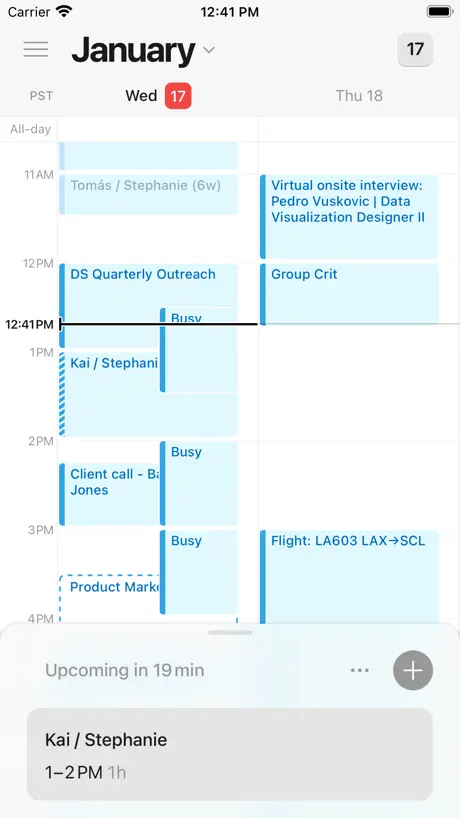
Notion Calendar Notion Calendar — Productivity
Obsidian Obsidian — Productivity
Timepage Timepage — Productivity
How we see

Every icon is a system of decisions

Bear app icon
Corner Radius
iOS continuous curve at 22% of icon width. Not a simple border-radius — a superellipse that Apple calls “squircle.”
Palette
Single-hue warm red #D4463C with white glyph. High contrast, category-agnostic. Reads at 16px on the home screen.
Glyph
Centered bear silhouette with pen nib. The metaphor is tactile — writing by hand. No text, no gradients, no shadows.
Grid
Optical center slightly above geometric center. The glyph sits in the upper 60% of the safe area, creating visual lift.
Theory Library

48 documents on why design works

Not tutorials. Not blog posts. Structured reference documents covering the principles that separate considered design from generated output. Bilingual English + Chinese.

07
Sample Document
Gestalt Principles in Interface Design

How proximity, similarity, closure, and continuity shape the way users perceive grouped elements, card layouts, and navigation hierarchies. With annotated examples from Spotify, Bear, and Apple Maps.

Perception & Cognition
Gestalt Principles Visual Hierarchy Cognitive Load Theory Fitts's Law Color Theory & Systems Typography Scales
Systems & Craft
8pt Spacing Grid Icon Grid Systems App Icon Craft SF Symbols Integration Motion & Animation Dark Mode Design
Strategy & Evaluation
Nielsen Heuristics Norman Design Principles Screenshot Composition ASO Visual Strategy Accessibility Standards Cross-Cultural Design

The reference shelf that AI doesn't have—yet.

Visual taste can't be prompted into existence. It has to be studied, absorbed, and organized. That's why we built Design KB—93,000 curated examples of what good looks like, so you (or your tools) can finally see the difference between generated and considered.

Browse the collection
R19